

01/ 06
The document layer
One service instead of hand-written converters
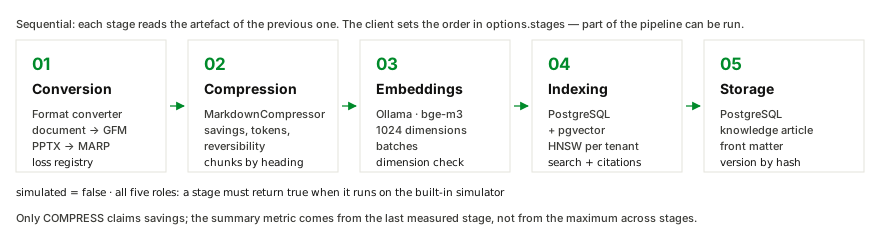
A PDF, a deck or a spreadsheet goes in. Markdown, chunks, vectors and an indexed article come out — and every stage says whether it measured its result or ran on the simulator.



The document layer for AI stacks
PDF → Markdown → compressed context → embeddings → search
Contextum is a standalone service that turns documents into structured Markdown, compresses the context with measurable savings, chunks it, and lands it in a knowledge base with vector search. It plugs into the agent infrastructure you already run, and every stage states whether it measured its result or ran on a simulator.
01 / What it is
For the team that runs the agent stack — and for the platform team that owns the file part of it.
01
Conversion to Markdown by the format converter — headings, tables and lists recovered, and a registry of what did not survive.
02
Context compression with measurable savings. The engine reports what it saved on this document, and names the stage that measured it.
03
Embeddings, a vector index and a knowledge base — searched with citations and a heading path, not with a loose paragraph of context.
04
A separate service with its own roles and its own scaling. The unit of scale is the role, not the agent.
Boundaries
Contextum does not handle dialogue orchestration, model selection or execution, end-user authentication, or per-document access rights. Those belong to the agent layer or to an external authorization layer. The file layer does not decide who sent a document and why: the tenant is derived from the access key before anything else happens.
Contextum is developed alongside AI Runtime Layer, the upper agent layer. AI Runtime Layer owns dialogue, model selection, memory and tools. Contextum owns everything file-related hub, tool, plugin for you Agents or Harness layear.
02 / What you get
Contextum is not a hosted API and not a library. It is a service you deploy, with the pieces a customer actually receives.
01
Five stages behind one HTTP call: CONVERT, COMPRESS, EMBED, INDEX, VAULT. The request names the stages and the order, and a subset can run on its own.
02
Every job, every artefact and every stage metric, live in the browser. A SIMULATION badge appears whenever a stage fell back to the built-in simulator.
03
The licence of the conversion engine travels with the delivery. Without it the service runs in a free mode with a limited document size.
04
We run a document set of yours through the pipeline and hand over what it measured: bytes, tokens, savings, chunks, and search quality against the baseline.
03 / Pipeline
The order is the caller's: it travels in options.stages. A subset of the pipeline can run on its own — conversion only, for example — or the whole thing.
| Stage | What it does | Engine | What it returns |
|---|---|---|---|
| CONVERT | PDF, DOCX, XLSX, PPTX, Markdown, HTML and plain text into Markdown. A PPTX becomes a MARP deck. | the format converter | a Markdown artefact and a registry of formatting losses |
| COMPRESS | Context compression and chunking by heading. | a fork of MarkdownCompressor.NET | compressed Markdown, chunks and savings metrics |
| EMBED | A vector for every chunk. | local Ollama or any OpenAI-compatible /v1/embeddings, bge-m3, 1024 dimensions | chunk embeddings |
| INDEX | Writes into the vector index and searches it. | PostgreSQL and pgvector, a partial HNSW index per tenant | the index, and search results with citations |
| VAULT | A knowledge-base article, versioned by content hash. | PostgreSQL | a versioned article |
Simulated is never silent
All five stages run on real engines. Every stage returns a simulated flag: while a role runs on the built-in simulator it is required to mark itself simulated = true, and the console shows a SIMULATION badge. Today all five return simulated = false — and every run checks it.
04 / Formats
| Format | Result | Notes |
|---|---|---|
| Markdown | Headings, tables and lists recovered; images anchored to the place they were drawn; a separator inserted between pages. | |
| DOCX | Markdown | Formatting inside table cells is preserved; numbered lists keep per-item numbering. |
| XLSX | Markdown | Sheet into a heading and a table; values are emitted as displayed — dates, currency, percentages. |
| PPTX | MARP dialect | YAML front matter, slides separated by ---, Marpit directives for background colour, background image and slide text colour. |
| Markdown, HTML, plain text | Markdown | Structure normalisation. The conversion engine is not needed for these. |
The loss registry
Markdown cannot express everything: colour, fonts, underlining, super- and subscripts, alignment, merged cells, charts, vector graphics. Everything that did not survive is recorded in the loss registry (FormattingLoss) and returned in the conversion result, in the worker log and in the API response. An empty registry means nothing was lost.
Images can be excluded with embed_images = false: text, tables, lists and structure remain, and the artefact and the embeddings get smaller. That is a user choice, not a loss, so it is not recorded as one.
05 / Benefits
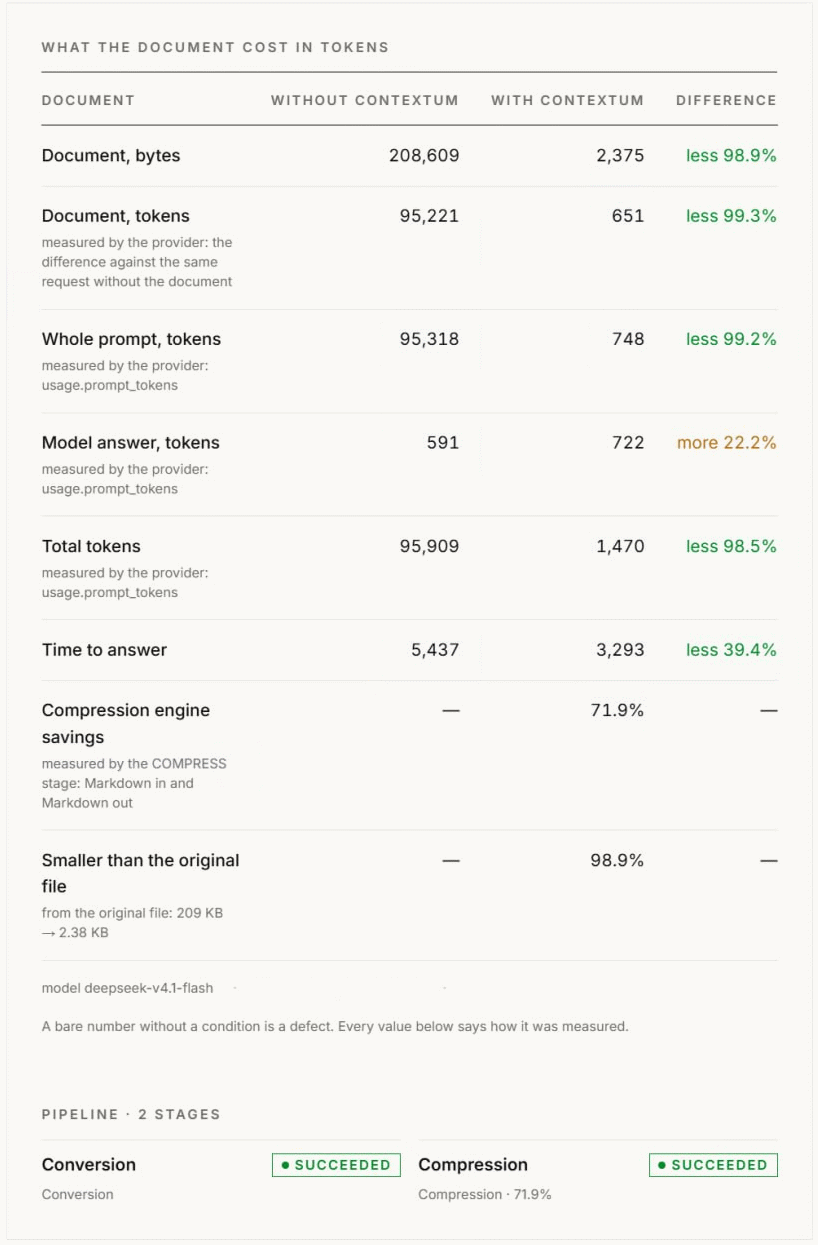
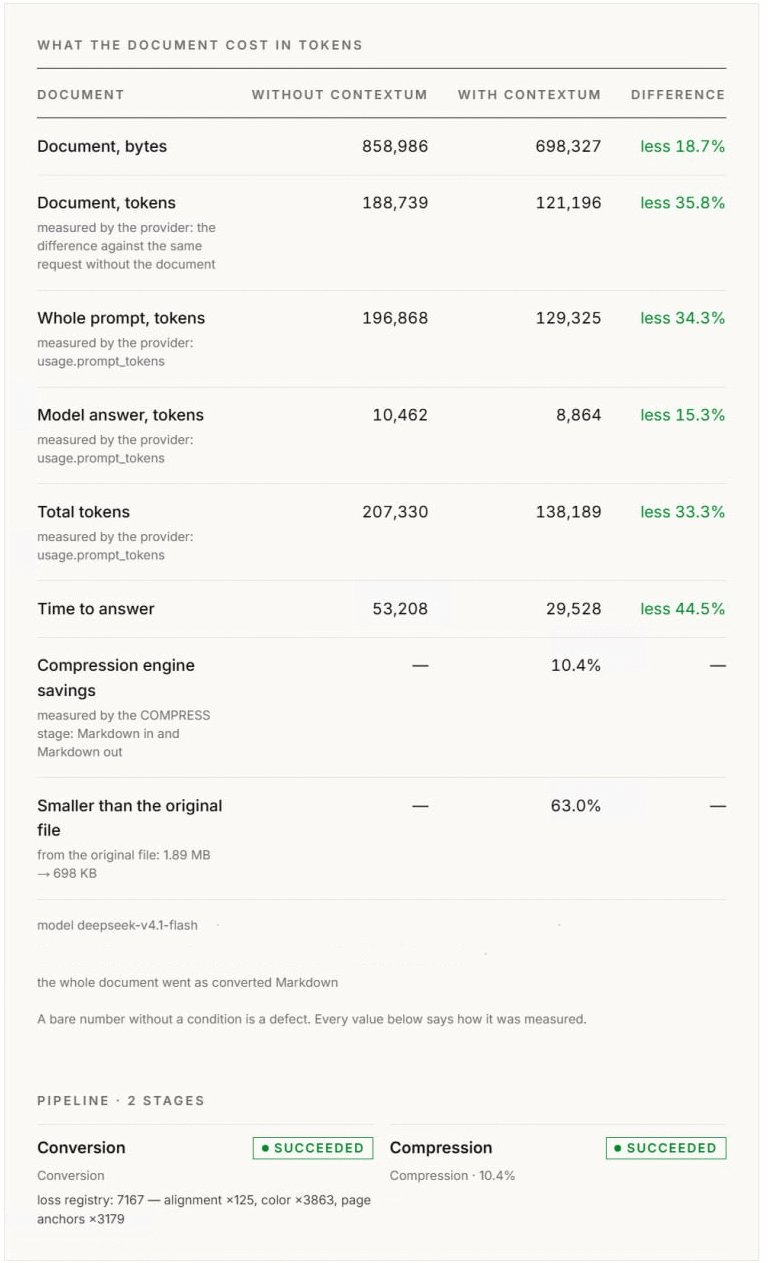
The same document, the same question, two ways to reach the model: straight from the file, or through the pipeline. The ledger below is the demo app’s own accounting — every number names how it was measured.
01
What goes into the model’s context.
02
What goes into the embeddings and the knowledge base.
03
One vector per chunk, in the model of your choice.
04
What gets searched later, with citations.
See an illustrative input-cost estimate—not a quote. Enter document-token usage from your own traffic, then compare it with two measured document examples. Bring your corpus to a demo and we will measure token use and retrieval quality before you decide whether a pilot makes sense.
The shortcuts set a volume; the field stays editable. Enter document-attributable input tokens measured from your own traffic—not whole prompts, answers, or company-size token estimates. Every shortcut is an illustrative example, not a benchmark of your traffic.
Standard input rate per 1M tokens. Cached input and provider-specific discounts may change the actual bill.
Indicative input price from AI Pricing Guru; check the provider’s current terms.
Estimated input-token cost avoided
This is a model-API cost estimate, not a net saving or Contextum ROI.
≈ $84.99a month
≈ $1 019.91 a year, at the same monthly volume
The annual figure assumes the same workload and price for 12 months; it is not a forecast.
The initial volume is an illustration. Replace it with your own document-input usage.
Based on the large document (gateway upload: 1.89 mb) measured example; results vary by corpus.
47 500 000 document tokens × 35.8 % = 16 998 567 input tokens avoided → $5.00 / 1M input tokens
The measured document-token reductions come from two demo runs on 2026-11-09: the 209 KB demo document: document input tokens, 95,221 → 651 (−99.3 %) and the large demo document: document input tokens, 188,739 → 121,196; aggressive profile (−35.8 %). Both use deepseek-v4.1-flash; document tokens are the difference in provider-counted prompt tokens with and without the document. These single-document results do not predict your corpus.
Only the input side is priced: the answer tokens are not part of the estimate — in one of the two runs the answer got longer.
Price data: AI Pricing Guru, checked 2026-11-09; DeepSeek pricing details: official API pricing. AI Pricing Guru’s dataset is used with attribution and is not republished here. Prices and tiers may change.
The default rate is GPT-5.5 at $5.00 / 1M input tokens (AI Pricing Guru, checked 2026-11-09). For context on usage: DeepSeek V4.1 Flash 1017 ranked #1 by tokens processed on OpenRouter on 2026-11-09 — a dated ranking for that platform, not an all-provider market ranking. Provider rates differ: DeepSeek is shown at its off-peak direct rate. The ranking identifies a popular model, not a single universal API rate: OpenRouter routes across provider endpoints, while this calculation uses the selected provider’s direct price.
The price is the standard input rate. Cached input, batch discounts, taxes and deployment-specific rates are excluded.
The estimate is computed in your browser. Nothing is sent anywhere. Popularity source: OpenRouter model rankings, accessed 2026-11-09.
Contextum may be a fit if your agents repeatedly process long or complex documents, need structured conversion, tenant-separated search or citations, and you can run a service in your own environment. It may not be a fit if document traffic is low, documents are already compact, or you only want a cheaper model API bill.
This is an orientation estimate, not a public offer, not a quote, and not a price of Contextum. It prices avoided input tokens only; it excludes output-token changes, Contextum deployment and support. Actual savings depend on your document mix, model profile, caching, workload and measured quality.
A measured demo can confirm the fit—or show that token savings alone do not justify a pilot.
06 / What it changes
The numbers below come from one document on one stand. This is what each of them does when it lands in your stack.
| Metric | Value | What it changes in your stack |
|---|---|---|
| Document relative to the source file | 1 886 125 → 856 923 bytes−54.6 % | The bytes you upload are not the bytes the model pays for: 1.8 MB in, 0.85 MB of context out. |
| Chunks in the index | 293 | The granularity your retrieval works at. The search below answers on a corpus of 10 documents. |
| Whole pipeline | 37.5 s | A 141-page contract, end to end. Embedding is 14.5 s of it. |
| Embeddings alone (293 chunks) | 14.5 s | The stage you scale on its own when the corpus grows. |
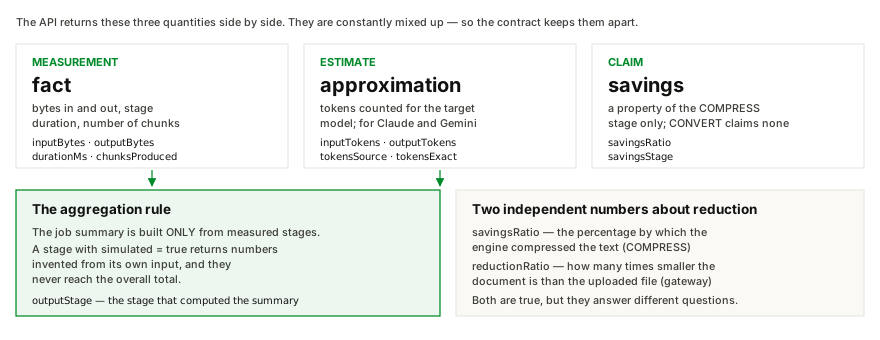
| Token count | tiktoken:o200k_base — exact for gpt-4o | Exact where the model publishes a tokenizer; an approximation for Claude and Gemini, and the metric says which. |
| Knowledge-base search | 3 hits, best score 0.588with a citation and a heading path | Hits with a score and a heading path — not a paragraph of guesswork. |
Against a corpus of 10 documents. The baseline is plain text with chunking.
| Metric | Platform | Baseline |
|---|---|---|
| recall@5 | 1.000 | 0.694 |
| nDCG@5 | 0.853 | 0.564 |
| MRR | 0.875 | 0.667 |
On the same corpus, recall@5 is 1.000 against 0.694 for plain text with chunking: the baseline misses the answer inside the first five hits in roughly a third of the queries.
Compression is not universal
Savings depend on the document and on the model profile, and the measurements show it. On the same contract, the aggressive profile delivered 19.05 % engine savings, while the minimal-compression profile for long context delivered 0.25 %. Verbose technical documentation yields tens of percent; legal contracts yield fractions of a percent. The platform reports that instead of rounding the number up.
Conditions
Measured on the stand on 2026-10-23: Docker Compose, Ollama with bge-m3 at 1024 dimensions, and a 141-page contract of 1 886 125 bytes. Search quality is a separate measurement against a corpus of 10 documents. Percentages of savings are relative to the document they were measured on.
07 / Integration
Your agent, your harness and your model stay where they are. Contextum takes the file part of the request and hands back context that is ready for the model.
01
Dialogue management, model selection, memory, and tool utilization are core functions of the agent layer. Contextum operates adjacently: it does not interact with end-users nor participate in model routing.
02
Conversion, compression, chunking, embeddings, indexing and the knowledge base. A PDF, a deck or a spreadsheet goes in; Markdown, chunks and vectors come out — with a registry of what did not survive.
03
Contextum does not call your model and does not choose one. It prepares what the model will read — the compressed context, the chunk to retrieve, the citation to point at — and your code calls the model, on your endpoint, under your policy.
04
The layer that assembles a request for the model can call Contextum directly and get back a document prepared for the AI: Markdown, chunks, or the hits with their scores and citations. No agent in the loop is required.
Six routes. What happens behind them is not part of the integration story.
| Call | What it does |
|---|---|
| POST /api/v1/jobs | submit a document and queue a job |
| GET /api/v1/jobs/{id} | the status, the stages and the metrics of a job |
| GET /api/v1/jobs/{id}/artifacts/{artifactId} | take an artefact: Markdown, chunks, embeddings |
| POST /api/v1/search | search the knowledge base of your tenant |
| GET /api/v1/meta | the option catalogue: profiles, compression levels, languages, stages |
| GET /healthz | readiness and dependencies — the only route that needs no key |
The same stack, two ways
Alongside AI Runtime Layer
Contextum is developed alongside AI Runtime Layer, the upper agent layer. AI Runtime Layer owns dialogue, model selection, memory and tools. Contextum owns everything file-related.
08 / Security
The service is deployed by you, in your environment, and it accepts calls only from the key you issue.
01
Contextum is not a hosted service: it starts in your own environment — on your machines or in your cloud account — and it is reachable only on the addresses you expose. Nothing about your documents travels to us.
02
Every call carries a key you issue. The key names the tenant and the scope — read or write — and caps the number of jobs that run at the same time. Only the hash of the secret is kept: the key itself is never stored and never logged.
03
Storage and search are separated by tenant alike, and a job that belongs to another tenant returns 404 rather than 403 — the response code cannot be used to look for what is not yours.
04
The gateway and its workers talk to each other over mutual TLS, and the certificates are created when the stack starts. The logs carry no keys and no document content — only the name, the size and the hash.
09 / Deployment
One command brings up the whole stack inside your environment. The console, the database and the logs stay yours — and so does the decision about which documents ever reach a model.
You see what reaches the model
Every document that went through the pipeline is in the console, with the artefact it produced and the metrics of every stage. The text that ends up in a prompt is the artefact you fetched yourself: what leaves your perimeter, and in which form, is your decision.
The embedding model is yours to choose
A local model inside your network, or your own provider endpoint — any OpenAI-compatible /v1/embeddings works. Where the text of your documents goes is your configuration, not ours.
Each stage runs in its own process and scales on its own: more conversion capacity on a busy day, less embedding capacity on a quiet one.
11 / How to buy
Contextum is delivered into your environment: your machines, your cloud account, your database. There is no list price and no packaged SKU — we look at the size of the job and agree the terms with you.
How it is licensed
Access is by a key you issue: <secret>|<tenant>|<scopes>|<maxJobs>. The tenant is derived from the key before anything else happens, only the SHA-256 of the secret is kept, and the key is never logged. The conversion licence is perpetual and travels with the delivery. AnetLab contracts with you directly.
What the price follows
Two things: the size of the deployment and the support level. There is no list price and no packaged SKU — we look at the job and come back with the terms. The number of documents you process is not on the invoice.
The first customer
For the first customer we work with, the product itself can be free. What is paid is support — and support is what pays for the work: the changes that adapt Contextum to your documents and to your corpus. We take one such customer at a time.
The free mode
In development mode, without the conversion licence, the service runs free with a limited document size: the same pipeline, the same console, the same metrics. The limit is the size of the document.
A demo on your corpus
You send a document set, we run it through and publish what it measured.
A pilot in your environment
One command, your key, your documents. Nothing of yours leaves your perimeter.
Production
The deployment, the perpetual licence, and the support and the updates agreed in writing.
Prefer to write? project@anetlab.com — the same form collects a demo, a quote and a partner conversation.
12 / FAQ
The text becomes usable for RAG: structure is preserved — headings, tables and lists — lost formatting is never dropped silently, and the result is chunked by heading, vectorised and indexed with citations.
Images are extracted and anchored to the place they were drawn, and can be excluded by option. Everything Markdown cannot express — colour, fonts, merged cells, charts — lands in the loss registry, so the conversion result states plainly what did not survive.
Two different numbers that must not be mixed. What the compression engine saved is measured by the COMPRESS stage: 0.25 % on the balanced profile and 19.05 % on the aggressive one, on a 141-page contract measured on the stand of 2026-10-23. How many times smaller the document became relative to the source file is arithmetic done by the gateway: −54.6 % on the same run.
Any OpenAI-compatible /v1/embeddings. The reference stand uses a local Ollama with bge-m3 at 1024 dimensions. The address and the model are configuration; the embedding client is injectable.
With the target model’s own tokenizer, offline, via tiktoken. For OpenAI models the count is exact and tokensExact is true. Claude and Gemini have no public tokenizers, so their count is marked as an approximation — and the metric always names its source.
Nothing extra happens: a stage that was delivered twice is not executed twice. The second delivery finds the finished result instead of starting a second run.
Yes. The stage list is part of the request; an empty list means the full pipeline. There is also a REST endpoint for a one-off conversion of a single file outside the pipeline.
Only your tenant. It is derived from the access key, a foreign job returns 404 rather than 403, and search runs against your own tenant’s index. Per-document rights are not modelled by the platform — that is the agent layer’s job.
Docker and about 8 GB of free memory. docker compose up -d, then an access key and a file upload to POST /api/v1/jobs. The conversion licence is perpetual and is included in the delivery; in development mode without it the free mode limits the size of the document.
There is no list price. Two things follow the terms: the size of the deployment and the support level — the number of documents you process is not on the invoice. We look at the job and come back with the terms. For the first customer we work with, the product itself can be free; what is paid is support, and support is what pays for adapting Contextum to your documents.
The service with its five stages, the operator console, the conversion licence, the documentation, and one measured run of a document set of yours. The deployment is not part of it: Contextum runs on your machines, in your cloud account, against your database.
AnetLab contracts with you directly. The conversion licence is perpetual and travels with the delivery; support and product updates are the part that is paid for year by year.
Yes. In development mode, without the conversion licence, the service runs free with a limited document size — the same pipeline, the same console, the same metrics. And for the first customer we work with, the product itself can be free: what is paid is support.
Yes. The delivery is a single docker compose up -d, and the integration surface is one HTTP call plus gRPC for control — the same client calls it either way. A partner can also request licence keys. See For partners.
13 / Demo
One service instead of hand-written converters: documents into Markdown, compressed context, embeddings, an index and search with citations — with honest metrics at every stage. Bring a corpus and we will run it through, and show what it measured.
Prefer to write directly? project@anetlab.com